
The Cool School for Learning Asian Languages

First-rate all-in-one Mobile Apps for learning Chinese, Japanese and Korean
Discover the perfect study partner which provides high value solutions. Be always up-to-date and pass your official test




Chinesimple your app for learning Mandarin Chinese
- Learn Chinese step by step. Start from scratch or pick up at your own level. From the very first lesson, you’ll put the grammar you learn into practice with games and exercises.
- Hear how each word is used. Listen to example sentences recorded by our native Chinese teachers to hear new words in context and get a feel for Mandarin tones.
- Remember what you learn. Save words to your own lists and review them with illustrated flashcards. Words you find harder to recall come up again sooner.
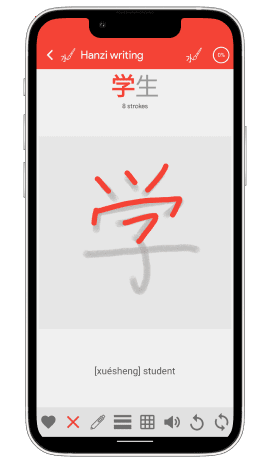
- Improve your handwriting and pronunciation. Learn the stroke order for Chinese characters and practise saying words and sentences aloud to check your pronunciation.
- Prepare for the HSK exam. Study the vocabulary for your level and take practice tests to see what you know and what to review next.
Download Chinesimple and get started for free.
On Google Play and the App Store · Available in 12 languages.


Prepare for the HSK exam, from HSK 1 to HSK 6
Chinesimple uses the HSK 3.0 vocabulary lists updated for 2026. Choose your level and focus on the words you need, whether you’re studying on your own or building on what you learn in class.
- Know what to study next. Follow the guided course for your level to build your vocabulary and grammar step by step. If you take classes, look up words from your last lesson and save them to a list for review.
- Go beyond recognizing individual words. See how words from your level fit together in sentences, then read and listen to stories narrated by our native Chinese teachers to see how much you understand.
- Find out what to review. Take a practice test at your level to see what you know and what needs more work before you sit the HSK exam.
Choose your level and get started for free.


Learn Chinese for everyday life
What would you like to say in Chinese? Maybe you’d like to order a meal, make plans with a friend or talk about your family. You don’t need an exam on the horizon to start with what matters to you.
- Find the words you need. Think of a word you needed in a conversation. Look it up in the dictionary and save it to your own list for next time.
- Hear how it’s said. Listen to example sentences recorded by native Chinese teachers. You’ll hear how a word sounds and learn how to use it in a sentence.
- Practise what you want to say. Repeat the sentences out loud and work on your pronunciation so you feel more confident the next time you speak.


JAPANSIMPLE Learn Japanese from scratch with the JLPT N5 course
Japanese is coming to the Khanji School app. You’ll start with a guided course at N5, the first level of the JLPT. You don’t have to be studying for the exam: the course is also a way to start learning Japanese on your own.
- Know where to start. The course will introduce new words step by step and show you how to put them together to make your first sentences.
- Hear how Japanese sounds. Follow along as native speakers read example sentences and short texts. You’ll start to connect what you see on the page with what you hear.
- Remember what you learn. Picture flashcards will help you review words from the course so you can recognise them the next time you read or hear them.
Planned for the first half of 2027 in the Khanji School app for Android and iOS.
KOREANSIMPLE Learn Korean from scratch with the TOPIK Level 1 course
Korean is coming to the Khanji School app with a guided course for beginners. Whether you’re studying for the exam or learning on your own, you’ll start by reading your first Korean words, understanding a greeting and introducing yourself.
- Discover hangeul, the Korean alphabet. Learn how the letters fit together so you can read your first words.
- Recognise what you hear. Follow the text as you listen to sentences recorded by native speakers and get a feel for the rhythm of Korean.
- Remember words you’ll want to use. Picture flashcards and games will help you recall the words you need to say hello, thank someone or talk about yourself.
Planned for the first half of 2027 in the Khanji School app for Android and iOS.

Do you have any questions?
Frequently Asked Questions (FAQs) about Khanji School AppsKhanji School Apps
What is Khanji School?
Khanji School is The Coolest School for learning Asian Languages such as Chinese, Japanese, and Korean.
Khanji School is the perfect Study Partner, which provides ALL-IN-ONE apps in order for you to be updated and pass your official test.
Khanji School’s Apps
Khanji School language apps are the perfect Study Partner for learning Asian languages, either on your own or as a complement to any Academic course, face-to-face or online, since they will allow you to reinforce what you have learned in class and learn new concepts on your own.
- Apps for Chinese Language Learning
- Apps for Japanese Language Learning (coming soon)
- Apps for Korean Language Learning (coming soon)
Remember that Khanji School language apps are not a substitute for conventional academic training but are the perfect complement to your daily study.
What languages are available in Khanji School apps?
Chinesimple apps are available in 12 languages: English, French, German, Italian, Russian, Spanish, Portuguese, Indonesian, Vietnamese, Thai, Hindi, and Modern Standard Arabic.
Japanesimple apps are available in 12 languages: English, French, German, Italian, Russian, Spanish, Portuguese, Indonesian, Vietnamese, Thai, Hindi, and Modern Standard Arabic.
Where can I get the Khanji School applications?
We only distribute Khanji School apps on official Google Play Stores and App Store.
We don’t distribute Khanji School apps on stores like Samsung Store, Huawei Store, Oppo Store, or Xiaomi Store, nor on non-official stores such as Apptoide, APKPure, APKsFull, APKCombo, APKMonk, APKFav, etc. If you find any Khanji School app (Chinesimple, Japanesimple or Koreansimple) in these stores, please do not download them. They might have been uploaded without our consent and may not be secure to use as we don’t control their content.
Remember that you need a device compatible with Google Play and Google Play Services for buying the apps and use certain features like speech recognition powered by Google Voice Service if you use the app on an Android device.
We will be delighted if you join the Khanji School community by downloading the apps at Google Play or App Store.
Types of User Plans: FREE & PRO Plan
What is included in the FREE plan?
Khanji School is committed to teaching Asian languages, which is why most of the content is free to access.
- Complete dictionary
- All frequently used sentences and expressions
- All short texts
- Multitude of games
- Many of the lessons
- Basic exam
The FREE plan includes advertising. Therefore, Khanji School encourages you to join the PRO plan to enjoy the whole experience.
What does the PRO Plan include?
With the PRO plan, you will have access to all the apps contents.
- All games
- All lessons
- All exams
The PRO plan does not include advertising.
User account
How do I create an account?
Register from the App to create a Khanji School account and save your progress.
With the same credentials as in your Khanji School account, you can log into any Khanji School application.
How do I sync data?
By creating an account with Khanji School you will be able to save your progress in the cloud. In addition, you will be able to synchronize your progress on different devices.
How do I synchronize purchases or subscriptions?
By creating an account with Khanji School, you will be able to synchronize your purchases on different devices. This way you can use the PRO plan on any Android and iOS mobile device. Remember to log in with the same Khanji School account and credentials is necessary.
How do I reset my study progress?
You can reset your progress within the very App. Go to the app settings, tap the restart progress button, and follow the steps shown there.
How do I delete my account?
You can delete your account from any of the Khanji School Apps, from your user profile. Attention! Your progress in all Chinesimple, Japanesimple and Koreansimple will be deleted. This operation cannot be undone.
Payments and Billing
What types of subscriptions are there?
Khanji School offers 1-month and 12-month subscription plans. You can subscribe within the Apps. If you do not cancel your subscription, it will be automatically renewed.
We trust the quality of our services and offer a 30-day money-back guarantee on all first-time purchases.
How do I manage my subscription?
You can check your subscription status at any time on your account at Google Play and App Store.
Remember that refund requests and payments are processed directly by Google Play or App Store. Anyway, feel free to contact us should there be any problem with your refund.
Is there any lifetime purchase option?
We also offer a lifetime PRO plan with a one-time payment. With your lifetime plan, you will have free access to any content or function added to the App.
How do I restore a Google Play purchase?
Remember that your purchases are linked to your Google Play account. Be sure to always use the same Google Play account on any device to be able to restore any purchase or subscription. Follow these steps to restore your purchase:
- Open the Google Play app.
- Tap on your profile & go to ‘Manage Apps and Device’.
- Go to the ‘Manage’ tab and select ‘Not installed’ on the selector.
- Find the Chinesimple HSK / Chinesimple HSK PRO app and install it again.
- You will be able to use full content again with all-new features.
How do I restore an App Store purchase?
Purchases are restored automatically when you open the app. In case this does not happen, you can restore them by pressing the “Restore purchase” button that you will find in the side menu of the main screen.
Remember that your purchases are linked to your Apple App Store account.
Problems upgrading to PRO plan
Does Google Play support your country?
Google Play purchases are available in many countries, but there are still some missing. Visit Google Play Paid app availability to check out if Google Play purchases are available in your country.
And if I am in China?
Google Play purchases are not allowed in mainland China, so the only way to make the purchase is via a VPN connection. Some users have recommended expressvpn.com as one of the most reliable VPNs.
I am not in China, and my country is listed as a supported location?
If you reach this point, your device may have some incompatibility with Google Play Services. This Google component may not come installed on some Chinese devices without Google Play support (Huawei, Xiaomi, Oppo, etc.). Please, check that your device has the latest version of Google Play Services.
And if I am in Russia?
We are sorry, but due to the Russian military invasion of Ukraine, both Google Play & App Store stores have disabled payments for any app, so there is no chance of buying any app or subscription until the conflict ends.
We hope everything will return to normal soon, so that anyone from any country may safely enjoy any app.
Problem upgrading to PRO plan after having checked the country list?
If your country is listed as one of the available countries for buying apps from Google Play, you should be able to purchase Chinesimple PRO.
Check out that your device has installed the Google Play Services. This component may not come installed on some devices without Google Play support (Huawei, Xiaomi, Oppo, etc.).
I am still trying to get PRO!
Contact us with your details!
Let’s find out what is going on on your device; write to hello@khanjischool.com with:
- The country you are currently in
- Have you previously bought or subscribed to any app on Google Play?
Technical Issues
Does my device not have Google Play and Google Voice?
Some Huawei, ZTE, Oppo, and other Chinese Android devices don’t support Google Play because they are designed to be used only within the Chinese market. Google Play & other Google apps are needed to use speech recognition & pronunciation features. You should install Google Play, Google Play Services, and Google app on your device so as to use these features.
I have problems with Google Voice
Samsung devices usually come with Google Play but do not use Google voice because they have their own voice services services such as HiVoice and Bixby. If your device already has installed Google Play, follow these steps:
- Check Google Play Services
- Find the Google app on Google Play. You have to install or enable it.
- After installing/enabling the Google app, open it. If it opens without any error, the pronunciation feature in the Chinesimple app should work.
I have problems with TTS (Text-To-Speech)
Some app content uses TTS to play audio. Some devices do not have any TTS configured, and do not play these audios. You can check what TTS you have configured on your device; We recommend using Google's TTS. Follow these instructions to change your TTS:
- Search Google Play for the Google app and install it.
- Open the Google app. This app is usually used for voice commands but it is also Google TTS.
- Go to "System" > "Accessibility" > "Text to Speech (TTS)" and select the Google TTS.
Why are Khanji School Apps Your Best Digital Classmate?
Because the very students say so!

Can we help you?
Fill out the form,and we will contact you